LAVA can export reaction forces (point loads and line loads) to a TXT file, which is also easily compatible with Microsoft Excel. This is very helpful to size pad footings for slab-on-grade foundation, and to deliver reaction forces to podium designing team.
The elements that produce reaction forces are: Beams, Bearing Walls, and Shear Walls. If a plate is not supported by beams or bearing walls, the reaction of this plate will not be exported. Therefore, it is advised that bearing walls and beams are modeled around all plates.
Export Reactions
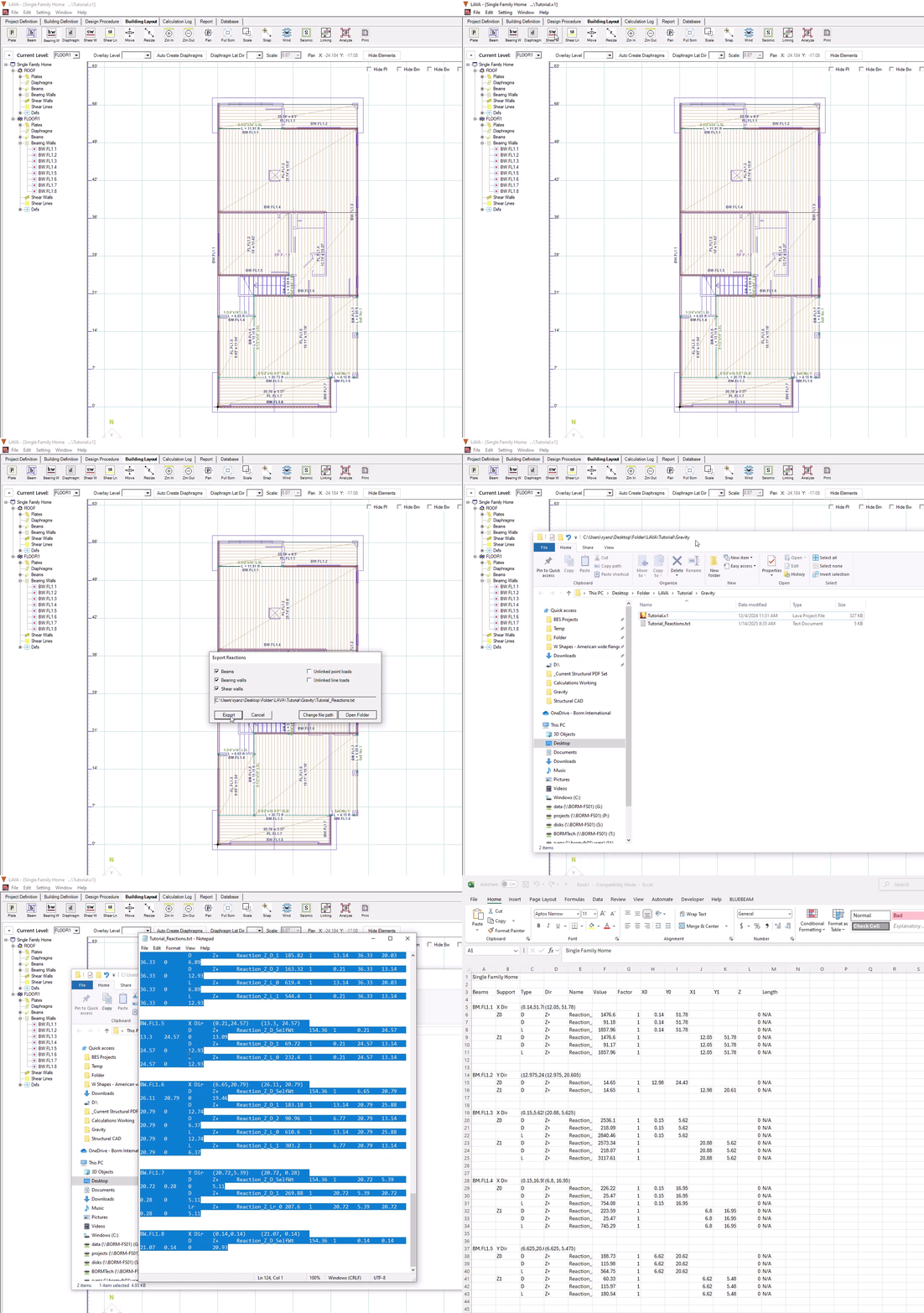
Go to program ‘File’ menu, select ‘Export Reactions’ to activate the command:
.png)
‘Export Reactions’ window pops up.
.png)
Beams: When this item is checked, reactions of Beams will be exported. This item is checked by default.
Bearing walls: When this item is checked, reactions of Bearing Walls will be exported. This item is checked by default.
Shear walls: When this item is checked, reactions of Shear Walls will be exported. This item is checked by default.
Unlinked point loads: If point loads from upper levels are not applied to any structural elements on lowest level, i.e. they have no load paths to the foundation, they will be categorized as ‘unlinked point loads’. When this item is checked, these unlinked point loads will be exported.
Unlinked line loads: If line loads from upper levels are not applied to any structural elements on lowest level, i.e. they have no load paths to the foundation, they will be categorized as ‘unlinked line loads’. When this item is checked, these unlinked line loads will be exported.
Export: The reactions of the checked elements will be written into a TXT file.
Cancel: Cancel operation.
Change file path: You can change the location to save the TXT file. The default location is the same as the LAVA file.
Open Folder: Open the folder where the TXT file will be saved at.
Operation
Before exporting loads, please make sure bearing walls are / or beams have been modeled correctly at the supporting locations of all plates, and shear walls and shear lines have been modeled correctly at the supporting locations of all diaphragms. When the model is ready, follow the steps below.
Click ‘Analyze’
.png) on Toolbar
on ToolbarClick ‘File’ at menu, and select ‘Export Reactions’
Click ‘Export’
When prompted, click ‘Yes’ to open the folder
Txt file ‘*_Reactions’ is created
If preferred, copy all the content in TXT file, and paste to blank spreadsheet
Result
.png)
The elements are listed at the first column: BM- Beam, BW- Bearing Wall, SW- Shear Wall.
Support ends are listed at the second column: Z0- Reaction of left / top end, Z1- Reaction of right / bottom end. Line loads will not have support ends.
Types are listed at third column: D- Dead Load, L- Live Load, Lr- Live Roof Load, Sn- Snow Load, W(+)- Wind Load Positive, W(-)- Wind Load Negative, E- Seismic Load
Directions are listed at fourth column: Z+: positive Z direction, caused by downward loads; Z-: negative Z direction, caused by uplifting loads.
Reaction names are listed at fifth column. Most of the names are self-explanatory. Please note: shear walls will only produce reactions of wind (W) and seismic (E) forces. There are two types of reactions: the ones with ‘OT’ that are calculated from overturning moment from lateral force (such as ‘Reaction_Z0_W(+)_OT‘), and the ones without ‘OT’ that are transferred from immediate upper level (such as ‘Reaction_Z0_W(-)_OT’). For example, for a 10’ long shear wall with 0.25 post offsets on each end, with unfactored wind force is 320 lbs applied at 9’ height, the reaction Reaction_Z0_W(+)_OT would be: 320 lbs x 9’ / (10’ - 0.5’) = 303.2 lbs.
The reactions will be listed with *r if they are part of a Rigid diaphragm solution. When Rigid diaphragms or Envelope is selected- the export will show both rigid and flexible reactions. That’s because the program runs both solutions during the analysis, click for further information on the analysis here.
Reaction values are listed at sixth column. Please note all values here are unfactored.
Factor is listed at seventh column. Since all values are unfactored, the factor is 1.
Location coordinates of the reactions are listed at eighth to twelfth columns.
Lengths of line loads are listed at thirteenth column. Point loads do not have values for length.