LAVA produces comprehensive calculation report. After the full scale analyze is finished, you can preview .png "image(425).png") or print
or print .png "image(426).png") the report under ‘Report’ tab. The sub window on the left lists all the contents that are available to include in the final report.
the report under ‘Report’ tab. The sub window on the left lists all the contents that are available to include in the final report.
.png "image(424).png")
By default, LAVA compiles all content in 8.5”x11” pages. If a different page setup is preferred, such as paper size, page orientation, margins, you can modify the setting at File - Page Setup.
.png "image(427).png")
.png "image(428).png")
An important component of the report is the key plan for structural elements. The key plan for gravity layout includes plates, bearing walls, and beams; the key plan for lateral layout includes diaphragms, and shear walls. For larger buildings, it is challenging to fit all content into 8.5”x11” page while maintaining legibility. You can use ‘Print’ .png "image(429).png") on toolbar under ‘Building Layout’ tab to make further adjustment to solve this issue.
on toolbar under ‘Building Layout’ tab to make further adjustment to solve this issue.
.png "image(430).png")
Range
include all elements: LAVA will fit all elements in the model space into one page, including the DXF background.
Specify: LAVA will scale a rectangle to fit in one page at the center. The rectangle is controlled by the input ‘X’, ‘Y’, ‘Width’, and ‘Height’. ‘X’ and ‘Y’ are the coordinate of the top-left corner of the rectangle, and ‘Width’ and ‘Height’ are the dimension of the rectangle in X and Y axes.
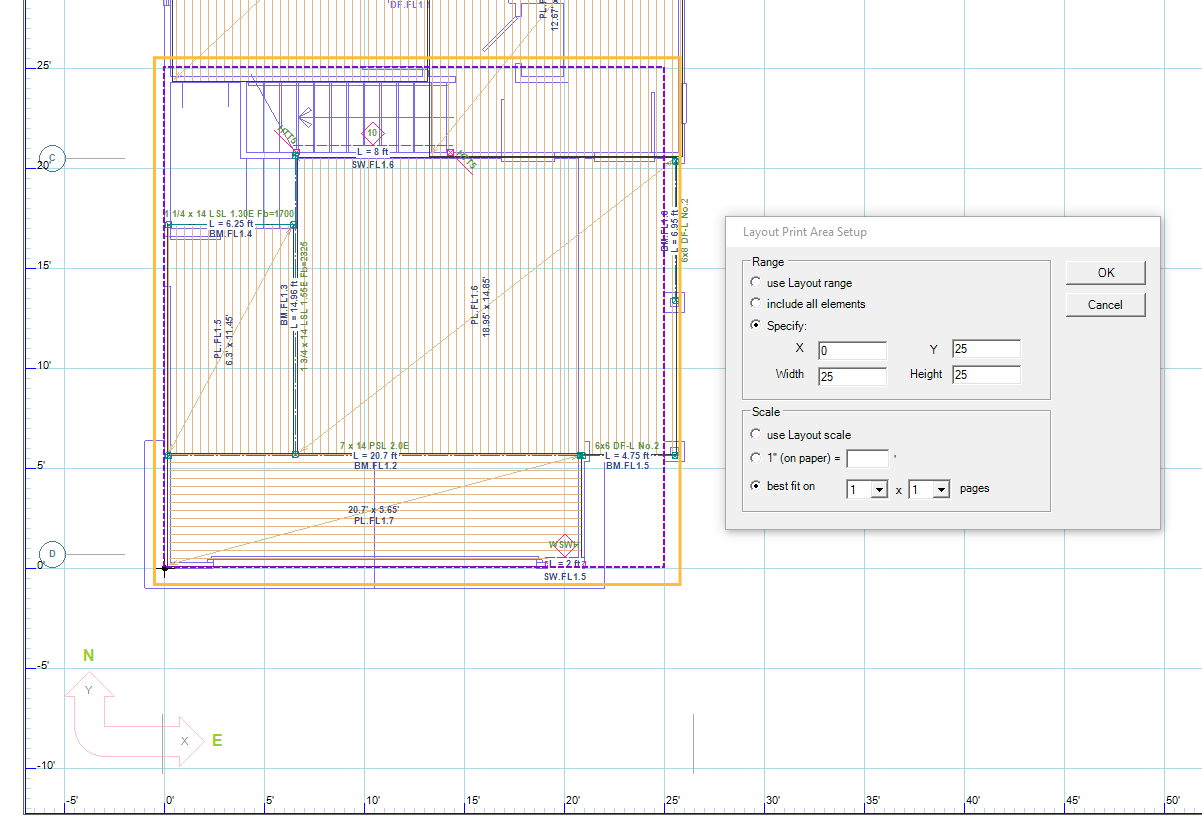
You can also use mouse to click-and-drag a rectangle directly in the model space, and LAVA will automatically register the ‘X’, ‘Y’, ‘Width’ and ‘Height’ values.
.png "image(433).png")
Scale
1” (on paper) =: LAVA will print the range of area with the scale specified input in this field.
best fit on: LAVA will print the range of area to best fit on the row and column number of pages selected. For example:
.png "image(435).png")
The above setting will split the range including all elements into two pages, dividing the range into two columns in one row:
.png "image(436).png")