In LAVA, under default settings, lateral loads (wind or seismic loads) are generated by Diaphragms, collected by Shear Lines, and distributed to Shear Walls. In this article, we will briefly discuss the three elements (Diaphragms, Shear Lines, and Shear Walls), and a few scenarios.
Directions (X, or Y)
Lateral loads are associated with either X or Y directions. A diaphragm modeled in X direction will only generate lateral loads in X direction, and will only interact with shear lines and shear walls in X direction. It will have nothing to do with any lateral loads or elements in Y direction. Therefore, for a simple box-like structure with shear walls at all four sides, a diaphragm must be modeled in X and Y directions, with the exact same dimensions.
Plan view:
.png "image(374).png")
Diaphragm in X direction:
.png "image(378).png")
Diaphragm in Y direction:
.png "image(379).png")
For a structure with a little more complicated lateral resisting system, diaphragms in X and Y direction will have much more difference configuration.
Diaphragm in X direction: since there are only shear walls at the exterior walls in X direction, only one large diaphragm is needed in X direction.
.png "image(380).png")
Diaphragm in Y direction: since there are shear walls at the exterior walls and at walk ways in the center of the plan in Y direction, three diaphragms are needed in Y direction.
.png "image(381).png")
Diaphragm Support
Similar to Plates, Diaphragms also have two supports: Support 0 and Support 1. Please see the screenshot below showing a diaphragm element in Y direction.
.png "image(367).png")
The subtle orange dotted rectangles on the left and right of the diaphragm indicate the location of support, and link margins. Shear Line elements must be modeled to interact with the diaphragm supports within the link margin:
.png "image(371).png")
For the lateral load generated by the diaphragm to be fully accounted for in the lateral design, both of the diaphragm’s supports must be supported by Shear Line elements. If only one of the supports is supported by a Shear Line, and the other is left unsupported, half of the lateral loads generated by this diaphragm will be lost in load path.
For cantilever diaphragms, please refer to Cantilever Diaphragm.
Shear Line as Collector
Just like actual drag collectors in lateral design, Shear Line collects lateral loads from a diaphragm, or from multiple diaphragms. The Height (in X direction) or Width (in Y direction) can be adjusted in Shearline Design dialog ‘Definition’ tab to accommodate offsets.
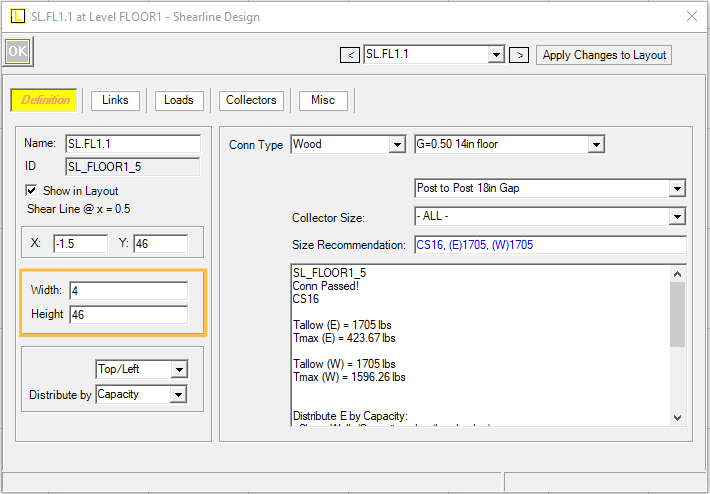
For example, please see the screenshot below. The exterior walls of the three units in plan-south have offset less than 4’. The three shear walls can be designed as one shear line, with drag collectors installed as shown.

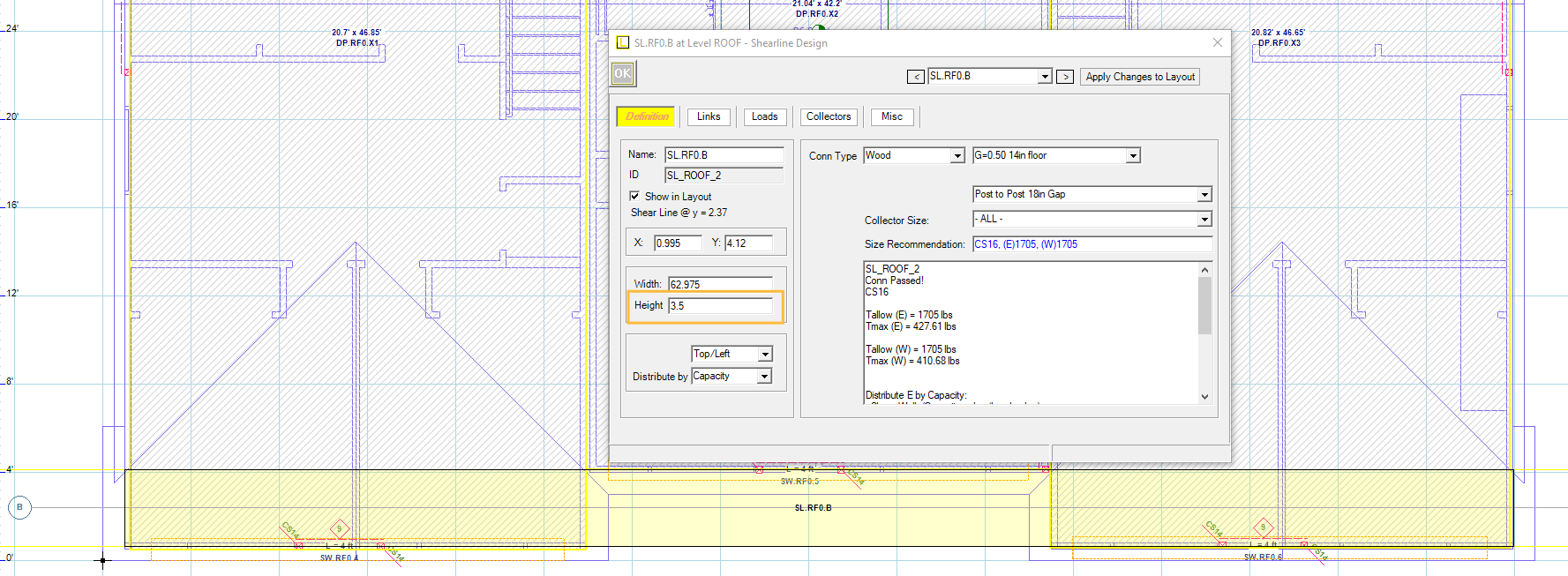
In LAVA, we can adjust the height of Shear Line B to be 3.5, so the dimension of this shear line in Y direction is increased to 3.5’. As shown in the screenshot below, the range of Shear Line B (yellow high-light rectangle) overlaps with the diaphragm link margin (orange dotted rectangles). The overlap can be only partial overlapping, and does not have to be fully enclosed by the shear line. Shear Line B will collect the loads from all three diaphragms.
To verify, you can click ‘Linking’ in tool bar  to link structural elements without running a full scale analysis, or click ‘Analyze’
  to run a full scale analysis. The ‘Analyze’ operation will take some time depending on the size of the model.
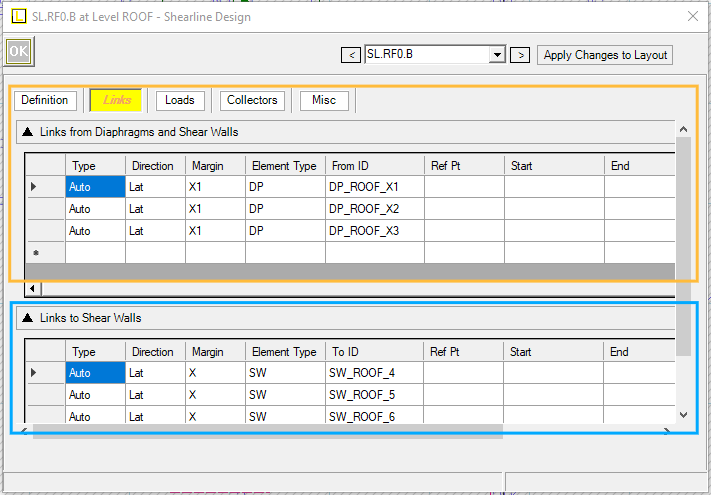
Open Shearline Design dialog, under ‘Links’ tab, you will see all three diaphragms in X direction are all automatically linked to Shear Line B. And because the range of Shear Line B also overlaps with the three shear walls on screen, you will see all three shear walls in X direction are also automatically linked to Shear Line B.
After a full-scale analysis, Collectors tab will show drag collector load analysis.
.png "image(399).png")
Drag analysis can be included into calculation report:
.png "image(400).png")