If you have a PDF file from the architect and you need to import that into LAVA, you can very easily convert the PDF to a DXF in AutoCAD.
Recommended workflow:
PDFIMPORT → Clean Up → OVERKILL → PURGE → Verify/Correct Scale → Save as DXF → Import into LAVA
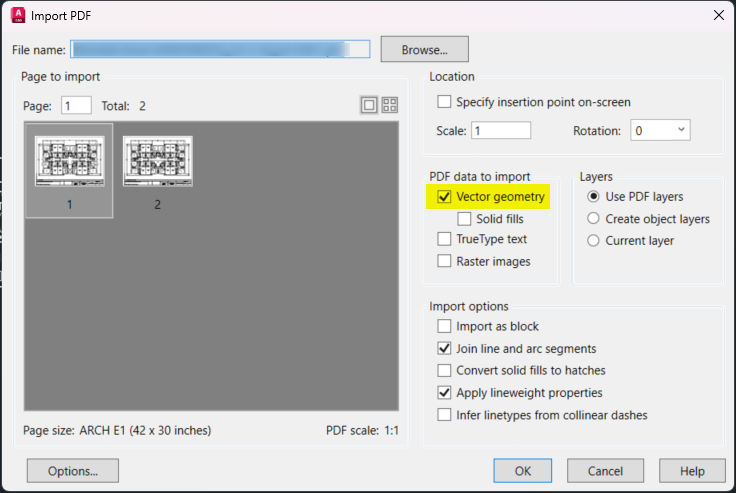
1. Import the PDF into AutoCAD
Open a new drawing in AutoCAD and use the PDFIMPORT command.
Select the PDF and the appropriate floor plan page. When importing, include the vector geometry. Text, fills, and raster images can typically be excluded if they are not needed for the LAVA background.
Tip: This process works best with vector-based PDFs that were originally created from CAD or Revit. Scanned drawings may not contain usable linework.
2. Clean Up the Drawing
Once the PDF has been imported:
Use
EXPLODEas needed to separate imported objects.Delete unnecessary information such as title blocks, notes, dimensions, furniture, fixtures, and other linework that will not be useful when modeling in LAVA.
Run
OVERKILLto remove duplicate and overlapping linework.Run
PURGEto remove unused drawing information.
The DXF does not need to be a fully cleaned architectural drawing. Keep the geometry that will be useful as a reference when creating the LAVA model.
3. Verify the Drawing Scale
Use DIST to measure a known dimension on the floor plan.
A common issue with PDF imports is that the drawing may be imported in inches rather than feet. For example, a building dimension that should represent 127 feet may measure only 127 drawing units.
In this case, the geometry needs to be enlarged by a factor of 12.
Use:
SCALE → Select All → Enter → Select a Base Point → Enter 12
This converts the imported geometry from the inch-based PDF scale to the appropriate size for the DXF background.
Important: Simply changing the AutoCAD drawing units from inches to feet does not resize the geometry. The drawing itself must be scaled.
After scaling, use DIST again on a known dimension to verify the drawing size.
4. Save the Drawing as a DXF
Use Save As and select a DXF format. An older DXF version, such as AutoCAD 2013 DXF, is a good option for compatibility.
If AutoCAD is unable to save the DXF, try:
Saving to a different location, such as the Desktop.
Using a simple filename.
Using the
DXFOUTcommand instead of Save As.Running
AUDITandPURGEbefore trying again.
5. Import the DXF into LAVA
The cleaned and properly scaled DXF can now be imported into LAVA and used as a background for laying out the model.
See this article for further instructions on how to adjust the DXF to easily import into LAVA.