👉 Watch this feature in action here: Export LAVA Gravity Loads to ADAPT Builder
Download Link:
Why Export Reactions?
LAVA automatically calculates gravity reactions for beams, bearing walls, and shear walls as part of the building analysis. These reactions are often needed by structural engineers to continue the design process in other software.
Typical applications include:
Designing concrete podium slabs
Designing mat foundations
Transferring loads to a concrete design consultant
Designing spread footings and foundation systems
Integrating with other structural engineering software
LAVA exports these reactions to a structured text file that contains the location, load case, and reaction for every supported element. This file can be used directly with the included LAVA to ADAPT Converter, which creates ADAPT Builder-compatible load files.
Exporting Reactions
1. Complete Your Model
Before exporting reactions, verify that the model has a complete gravity load path.
Plates (diaphragms) should be supported by beams or bearing walls.
Shear walls should be properly connected to the diaphragm where applicable.
Any unsupported elements will not produce reactions.
2. Analyze the Model
Click Analyze to perform the structural analysis and calculate all reactions.
3. Export Reactions
Select:
File → Export Reactions
Choose the elements you would like to export.
Beams
Bearing Walls
Shear Walls
Unlinked Point and Line Loads (optional)
Click Export.
LAVA creates a file named:
<ProjectName>_Reactions.txt
This file contains all reaction information required by the converter utility.
Using the LAVA to ADAPT Converter
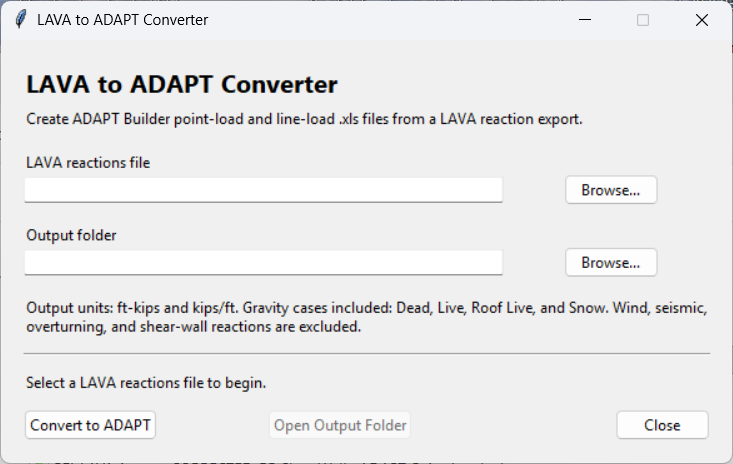
The included converter reads the exported reaction file and automatically generates the files required by ADAPT Builder.
Simply:
Run analysis and export reactions from LAVA.
Download the LAVA to ADAPT Converter.
Launch the LAVA to ADAPT Converter.
LAVA reactions file
*_Reactions.txtfile.Output file will automatically populate and you can alter it’s location by clicking Browse…
Click “Convert to ADAPT” to create two files:
<Project>_ADAPT_Point_Loads.xls<Project>_ADAPT_Line_Loads.xls
Importing into ADAPT Builder
In ADAPT Builder:
Open your model.
Select the reference plane where the loads should be imported.
Choose File → Import → XLS Loads.
Import the Point Loads file.
Repeat the process for the Line Loads file.
During import, map the ADAPT load cases to your project load cases if necessary.
What Gets Exported?
The current converter transfers gravity reactions only.
Supported load types include:
Dead Load
Live Load
Roof Live Load
Snow Load (when present)
Wind Loads ±
Earthquake Loads
The converter automatically:
Maps LAVA load cases to ADAPT load cases
Converts reaction forces into ADAPT point and line loads
Writes the files in the Excel 97-2003 (
.xls) format required by ADAPT Builder
Wind, seismic, overturning, and other lateral reactions are intentionally excluded from this workflow.
Additional Information
For a detailed explanation of the reaction data contained in the exported text file, including reaction names, coordinates, load cases, and element information, see the Export Reactions help topic.
For information about ADAPT's import process and load mapping options, refer to the ADAPT Builder documentation.