Overview
LAVA Reaction Overlay is a standalone companion utility for LAVA that adds structural reactions directly to a LAVA DXF export.
The utility combines two files exported from LAVA: DXF and Export Reactions text file. It creates a new annotated DXF showing Beam (BM), Shear Wall (SW), and Bearing Wall (BW) reactions at their corresponding locations in the drawing.
Download:
👉 Watch this feature in action here: LAVA Reaction Overlay | Automatically Add Structural Reactions to Your DXF
Starting LAVA Reaction Overlay
LAVA Reaction Overlay is distributed separately from the main LAVA installation.
After downloading the LAVA Tools folder:
Extract the downloaded ZIP file to a folder on your computer.
Keep all files contained in the extracted folder together.
Double-click LAVAReactionOverlay.exe Shortcut
No changes to your LAVA installation are required.
Before You Start
In LAVA, create both of the following files for the same model and floor:
Export the DXF
Export Reactions
For the easiest workflow, save both files in the same folder.
Important: The DXF and Export Reactions file must be from the same LAVA model and floor. Using files from different models or floors may result in reactions being placed incorrectly.
Creating an Annotated DXF
1. Select the DXF File
Select Browse next to DXF File and choose the DXF exported from LAVA.
2. Select the Reaction File
Select Browse next to Reaction File and choose the corresponding LAVA Export Reactions text file.
When possible, LAVA Reaction Overlay will automatically locate the corresponding reaction file if it is stored in the same folder as the DXF.
3. Select the Output File
An output filename is generated automatically.
You can use the suggested location and filename or select a different location.
4. Select the Reactions to Display
Choose which structural reactions you want included in the DXF:
Beam Reactions
Shear Wall Reactions
Bearing Wall Reactions
All three can be displayed together, or individual reaction types can be turned off.
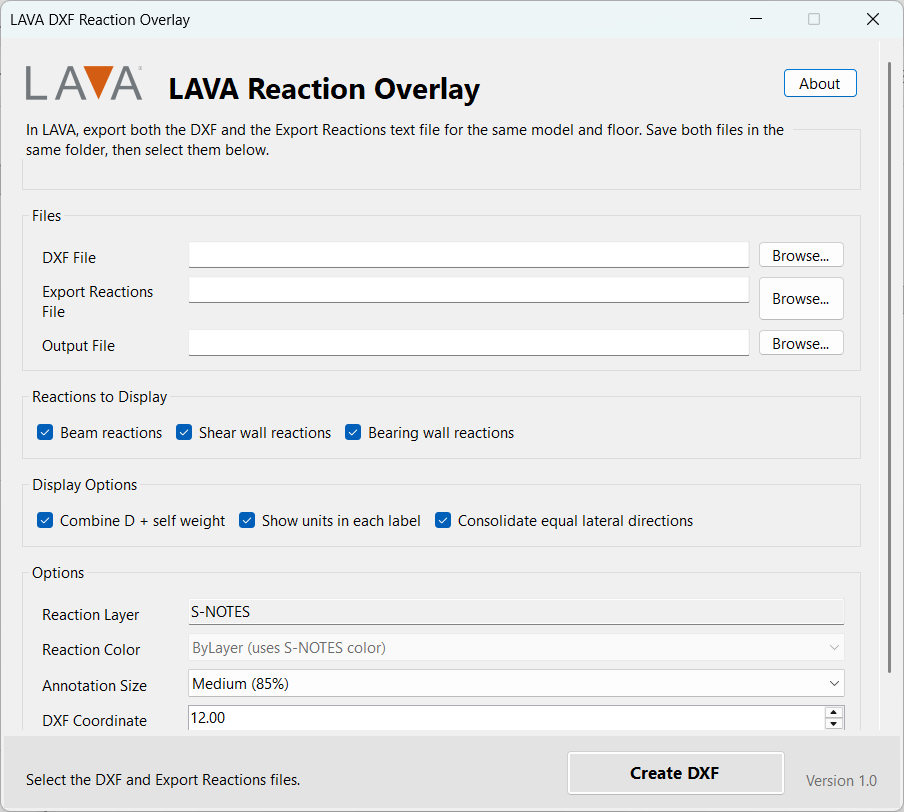
Display Options
Combine D + Self Weight
Select Combine D + Self Weight to combine the Dead Load and Self Weight reactions into one displayed Dead Load reaction.
For example:
D  Z+: 1570
SW Z+:   91
becomes:
D Z+: 1661This can significantly reduce the amount of reaction information shown on the drawing.
Consolidate Equal Lateral Directions
Select Consolidate Equal Lateral Directions to combine equal reactions from opposite lateral load directions.
For example:
W+ Z+: 1828
W- Z-: 1828
can be displayed as:
W+/- Z: 1828Overturning reactions are consolidated separately from the standard reactions.
For example:
W+/- Z: 1828
W+/- OT Z: 4237
This option can make shear wall and other lateral reaction callouts considerably easier to read.
Show Units
Select Show Units to include units in each reaction callout.
Units are shown once at the top of the callout rather than repeated on every reaction.
Beam reactions: LBS
Shear Wall reactions: LBS
Bearing Wall reactions: PLF
For example:
SW.FL1.1 Z0 LBS
W+/- Z: 2691
W+/- OT Z: 5018
Flexible, Rigid and Envelope Results
No analysis-type selection is required.
LAVA Reaction Overlay automatically evaluates the reaction file to determine which results are available.
Flexible Results
If the reaction file contains only flexible diaphragm results, those reactions are displayed.
Rigid Results
If the reaction file contains only rigid diaphragm results, the rigid reactions are displayed.
Envelope Results
If both flexible and rigid results are present, LAVA Reaction Overlay automatically compares corresponding reactions and displays the governing reaction.
Users do not need to remember whether the LAVA model was run using Flexible, Rigid, or Envelope diaphragm analysis.
Annotation Size
Three annotation sizes are available:
Small
Medium
Large
Medium is recommended for most drawings.
Changing the annotation size adjusts the complete callout, including:
Text size
Callout box size
Padding
Leader length
Bearing wall label offsets
Annotation spacing
The DXF coordinate scale is handled separately and normally does not need to be changed.
Beam Reactions
Beam reactions are displayed at the corresponding beam support.
Each support is identified as Z0 or Z1.
For example:
SW.FL1.1 Z0 LBS
W+/- Z: 2691
W+/- OT Z: 5018
A boxed callout and leader identify the corresponding beam support location.
Shear Wall Reactions
Shear wall reactions use the same boxed callout format as beam reactions.
Callouts are placed at the corresponding shear wall end and may include gravity, lateral, and overturning reactions depending on the results available in the LAVA reaction file.
For example:
SW.FL1.1 Z0 LBS
D Z+: 3258
W+/- Z: 2691
W+/- OT Z: 5018
E Z+: 5024
E OT Z+: 6127
Bearing Wall Reactions
Bearing wall reactions are displayed adjacent to the corresponding bearing wall.
Because bearing wall reactions are distributed reactions, they are shown in PLF rather than pounds.
Bearing wall annotations do not use the boxed leader format used for beams and shear walls.
Layers
Reaction annotations are currently created on the existing: S-NOTES
The annotation objects use ByLayer properties so their appearance can be controlled using the layer settings in AutoCAD.
Annotation Placement
LAVA Reaction Overlay automatically positions reaction callouts based on the structural element location.
The utility:
Places reactions at their corresponding LAVA coordinates
Automatically sizes boxes based on the displayed information
Adds padding around reaction text
Places leaders between the callout and structural element
Attempts to avoid overlapping reaction callouts
Offsets bearing wall reactions from the wall for readability
For congested drawings, some manual repositioning of annotations in AutoCAD may still be helpful.
Creating the DXF
Once the files and display options have been selected, click:
Create DXF
When processing is complete, LAVA Reaction Overlay displays a summary showing the number of:
Beam support reactions
Shear wall reactions
Bearing walls
You can then choose to:
Open Drawing to open the new DXF.
Open Folder to open the folder containing the new DXF.
Close to return to the utility.
Output Files
LAVA Reaction Overlay creates a new DXF file.
Your original LAVA DXF is not modified.
The annotated DXF can then be opened in AutoCAD or another compatible CAD application for review and further editing.
Recommended Settings
For most projects, we recommend:
Beam Reactions                         ✓
Shear Wall Reactions                   ✓
Bearing Wall Reactions                 ✓
Combine D + Self Weight                ✓
Consolidate Equal Lateral Directions   ✓
Show Units                             ✓
Annotation Size: Medium
DXF Coordinate Scale: 12.00
Layer: S-NOTES
These settings generally provide the most compact and readable reaction output.
Troubleshooting
Reactions appear in the wrong locations
Verify that the DXF and Export Reactions file were created from the same LAVA model and floor. Also verify that the DXF Coordinate Scale has not been changed from its normal setting.
Reaction callouts overlap
Try using the Small annotation size. Very congested plans may still require minor manual repositioning in AutoCAD.
Too much information is displayed
Enable Combine D + Self Weight and Consolidate Equal Lateral Directions, or turn off reaction types you do not need.
The utility does not find the reaction file automatically
Use Browse to select the Export Reactions text file manually.
The utility does not start
Make sure the entire downloaded ZIP was extracted before running the program. Do not move LAVAReactionOverlay.exe out of the extracted application folder because supporting files are required.
About LAVA Reaction Overlay
LAVA Reaction Overlay is a companion utility for LAVA structural design software.
The utility is distributed separately from the main LAVA installation so improvements and updates can be released independently.
For additional information about LAVA or assistance with LAVA Reaction Overlay, contact LAVA technical support.