When two beams frame into the same support location, LAVA automatically allows one beam to transfer its load into another beam before the load continues down to the supporting column/post.
How LAVA Determines Which Beam Carries the Load
When two beams share the same support point:
The lower numbered beam transfers its reaction into the higher numbered beam
The higher numbered beam becomes the final beam that carries the combined load to the column/post below
Example
If both beams frame into the same location:
BM.RF1.5
BM.RF1.9

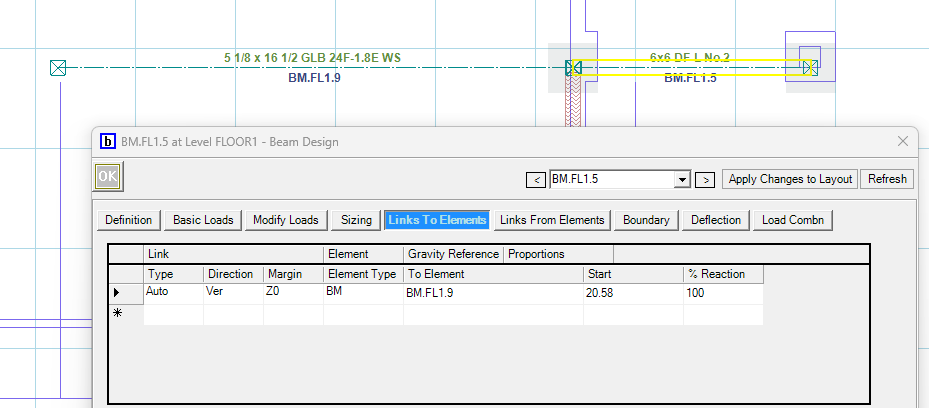
LAVA will automatically transfer the reaction from BM.RF1.5 → BM.RF1.9
Then:
BM.RF0.9 → Column/Post Below
This creates a continuous load path without requiring manual load calculations.
You can review this in the “Links to Elements” to verify that the beams are linked.
Note: The Beam BM.RF1.9 doesn’t get designed for the extra load from BM.RF1.5 only the Post will see this load from the neighboring beam.
Column Display Behavior
Since both beams may initially show a column at the same location:
One column will receive the transferred load
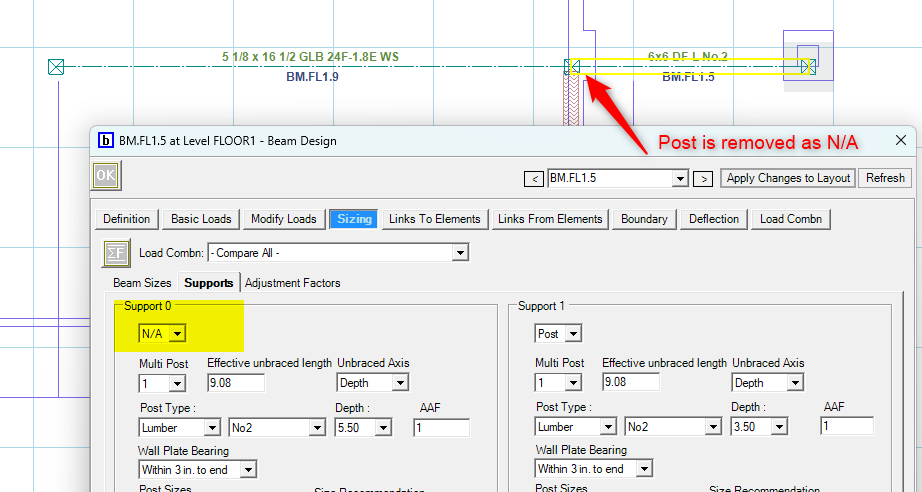
The second column may become redundant for display purposes
To clean up the model:
Review which column is receiving the final combined load
Turn off the duplicate column display for the beam being carried by setting it to N/A
This helps prevent overlapping columns from appearing in your model while maintaining the correct structural behavior.
Best Practice
After creating shared beam conditions:
Review beam numbering
Confirm the intended beam is carrying the final load
Verify the final column receives the combined reaction
This ensures the model reflects your intended load path.