By default, a flexible diaphragm distributes load to the supporting shear lines based on tributary area. For a simple diaphragm supported by shear lines on opposite sides, this typically results in a 50/50 distribution, with half of the diaphragm load going to each side.
However, there may be cases where you want to control how much load is delivered to each shear line. For example, you may have exterior and interior shear lines and want to intentionally direct a larger portion of the diaphragm load to an interior shear line.
LAVA allows you to manually adjust this distribution.
Setting Up Manual Diaphragm Load Distribution
To control the load distribution:
Double-click the diaphragm to open the Diaphragm dialog.
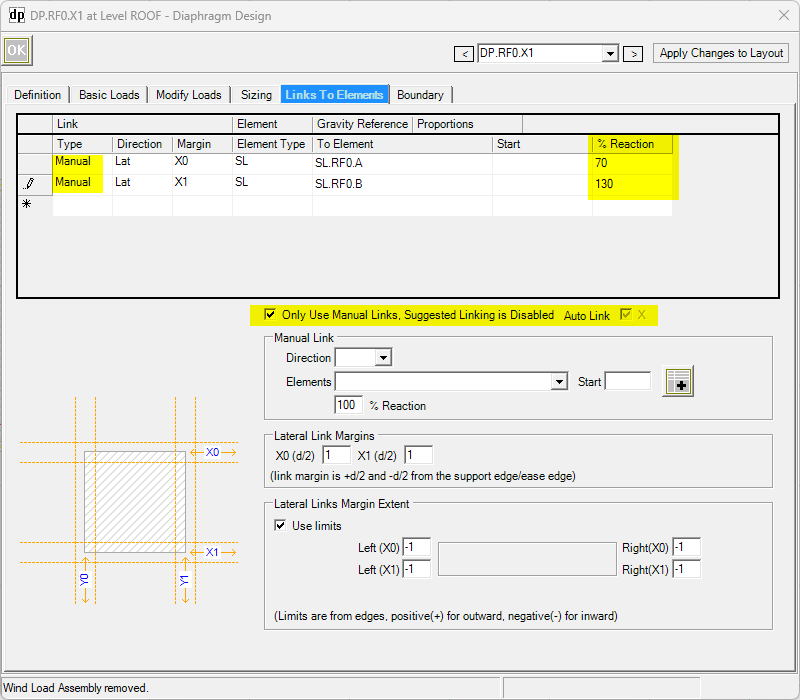
Set the diaphragm Type to Manual.
Use Manual Links to define which shear lines receive the diaphragm reactions.
Adjust the Percentage Reaction for each side of the diaphragm.
Understanding Percentage Reaction
The Percentage Reaction setting is based on the reaction that would normally occur on each side of the diaphragm.
For a simple flexible diaphragm with equal tributary areas, each side receives 50% of the total diaphragm load. LAVA defines this normal reaction as 100%.
Therefore:
100% / 100% = normal 50/50 distribution
70% / 130% = modified 35/65 distribution
80% / 120% = modified 40/60 distribution
50% / 150% = modified 25/75 distribution
The percentages assigned to the two sides should total 200% when you want to redistribute the full diaphragm load without increasing or decreasing the total load.
Example: 70% / 130% Distribution
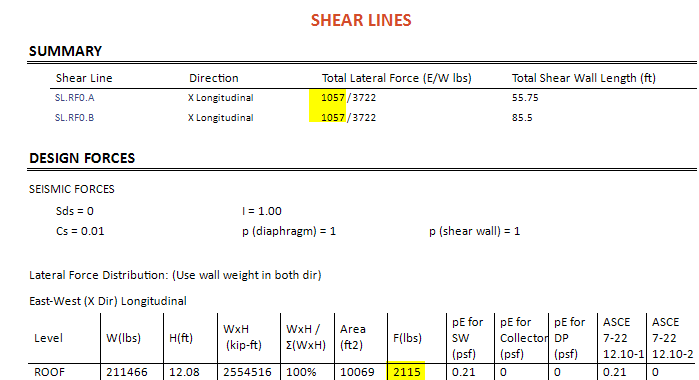
Assume the diaphragm has a total lateral load of 2115 lb.
With the default distribution:
Side 1 = 1,057 lb
Side 2 = 1,057 lb
Each of these reactions represents 100% of the normal reaction.
Now suppose you enter:
Side 1 Percentage Reaction = 70%
Side 2 Percentage Reaction = 130%
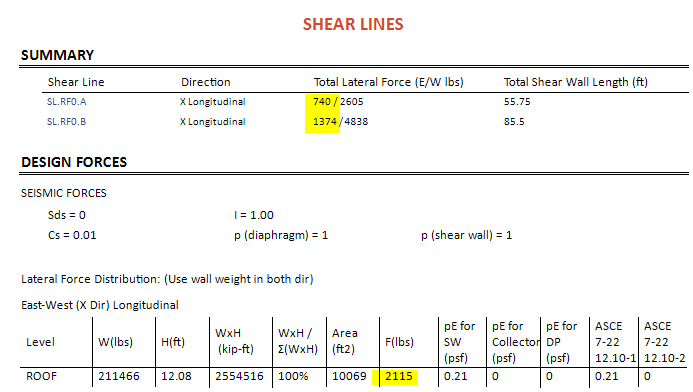
LAVA applies these percentages to the normal 2,115 lb reaction:
Side 1
1,057 lb × 0.70 = 740 lb
Side 2
1,057 lb × 1.30 = 1,374 lb
The resulting diaphragm distribution is therefore:
Side 1 = 35% of the total diaphragm load
Side 2 = 65% of the total diaphragm load
The complete 10,000 lb diaphragm load is still accounted for, but you have manually controlled how that load is distributed between the two sides.
From the Diaphragm to the Shear Walls
The Percentage Reaction setting controls how the flexible diaphragm load is allocated to the shear lines.
Once the load reaches a shear line, LAVA distributes that shear-line load to the individual shear walls associated with that line according to the applicable shear-line distribution settings.
This gives you control over the load path at two levels:
Diaphragm → Shear Lines → Shear Walls
Using Manual Links and Percentage Reaction allows you to define a flexible diaphragm load path that better represents how you want the lateral loads distributed through the structure.
Important: When manually adjusting the Percentage Reaction, the user is responsible for ensuring that the percentages assigned to both sides total at least 200%. This ensures that at least 100% of the diaphragm load is accounted for. LAVA does not currently validate or error-check these percentages and will not provide a warning if the combined percentage is less than 200%.